
DLink DCS-2132L
Moderator: Staff
5 posts
• Page 1 of 1
-

azctflyer - Posts: 2
- Joined: Wed Mar 18, 2015 3:56 pm
DLink DCS-2132L
'Can't seem to get the DLink DCS-2132L camera to work. It's pretty mainstream and seems to have a lot of flexibility, but...
-

Devin - Posts: 719
- Joined: Wed Mar 12, 2014 5:48 pm
Re: DLink DCS-2132L
Hi azctflyer,
I did some research on this camera and found that the url that should work for this camera is rtsp://camera.ip.address/video1.sdp. This assumes that you have not changed the settings for RTSP port or for the different stream profiles. You can enter this URL in Sighthound Video by selecting "Other IP Camera" in the "Camera Type" drop list and use the following:
Protocol: rtsp
Port: <leave empty>
Stream Path: /video1.sdp
I've attached an image of how this should look once entered.
Regards,
-Devin
I did some research on this camera and found that the url that should work for this camera is rtsp://camera.ip.address/video1.sdp. This assumes that you have not changed the settings for RTSP port or for the different stream profiles. You can enter this URL in Sighthound Video by selecting "Other IP Camera" in the "Camera Type" drop list and use the following:
Protocol: rtsp
Port: <leave empty>
Stream Path: /video1.sdp
I've attached an image of how this should look once entered.
Regards,
-Devin
- Attachments
-
 Screen Shot 2015-03-18 at 2.23.21 PM.png
- (72.51 KiB) Downloaded 453 times
-
azctflyer - Posts: 2
- Joined: Wed Mar 18, 2015 3:56 pm
Re: DLink DCS-2132L
Thanks Devin,
Well, at least now it just keeps saying "connecting" and doesn't error-out... but still isn't showing video.
Question... video1.sdp or live1.sdp ?? (neither works, also tried 2 and 3). Also tried port 554. Using starter to make sure it will work.
thanks
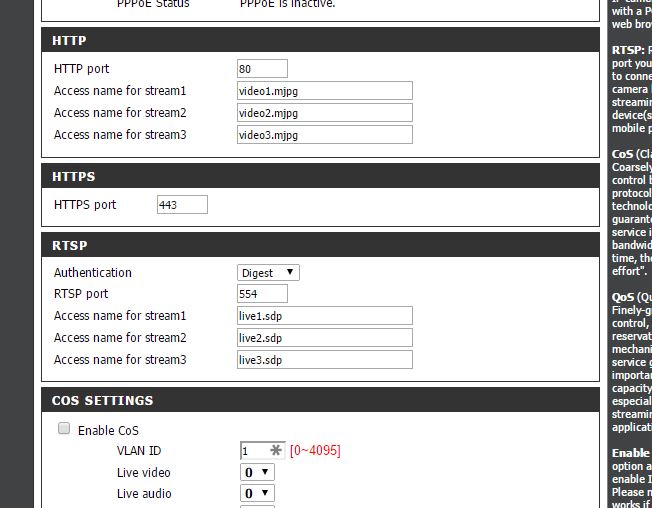
Well, at least now it just keeps saying "connecting" and doesn't error-out... but still isn't showing video.
Question... video1.sdp or live1.sdp ?? (neither works, also tried 2 and 3). Also tried port 554. Using starter to make sure it will work.
thanks
-
Devin - Posts: 719
- Joined: Wed Mar 12, 2014 5:48 pm
Re: DLink DCS-2132L
Hi azctflyer,
My apologies, I had meant to send both the live and play stream paths, though after seeing your screenshot it would appear video is for the http streams and live is for the rtsp streams.. I'd be happy to take a look at your logs for anything unusual if you could submit a bug report by going to Help > Report a Problem. In the meantime, as a test, if you temporarily switch the RTSP authentication to basic or disable are you able to connect?
Have you tried connecting using the following:
Protocol: http
Port: <leave empty>
Stream Path: /video1.mjpg
Regards,
-Devin
My apologies, I had meant to send both the live and play stream paths, though after seeing your screenshot it would appear video is for the http streams and live is for the rtsp streams.. I'd be happy to take a look at your logs for anything unusual if you could submit a bug report by going to Help > Report a Problem. In the meantime, as a test, if you temporarily switch the RTSP authentication to basic or disable are you able to connect?
Have you tried connecting using the following:
Protocol: http
Port: <leave empty>
Stream Path: /video1.mjpg
Regards,
-Devin
-

Carsten - Posts: 8
- Joined: Thu Oct 01, 2015 11:47 am
- Location: Hamburg, Germany
Re: DLink DCS-2132L
Have a DCS-2132L running with Sighthound and haven't experienced any problems. No special configuration has been necessary, the UPnP config worked out of the box.
Carsten
Carsten